
Part of: CAD & engineering: Guides and cases


Need to scan A0? A1? Arch E, D? ANSI? Or just random paper sizes?
Regardless of the size of your large format documents, the proper way to digitize them is by scanning with a large format scanner with dedicated large format scanning software.
To scan A0, A1 or other large paper, documents and art there is a wide range of scanners to choose from, and finding the right size scanner is only part of the work. The number of documents, the thickness of your originals, and any need to enhance or correct your images post-scanning are also things that need to be considered.
Pair that with your level of desired productivity, and the choice of scanner suddenly gets much easier.
Explore the Contex scanner product range and get ready to digitize, or jump straight to the size charts.
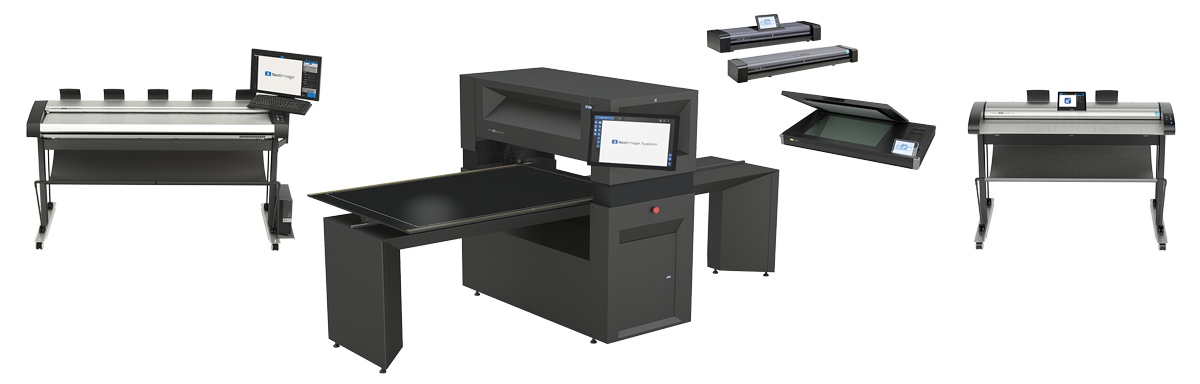
Different types of large format documents
Big ideas are often created on large format paper. Scanner requirements are highly specific to application and document types. Find scanners that match based on type of original, size, thickness, volume and your way of working in the interactive product selector.
Scanning technical documents
Point-to-point accuracy, intelligent clean-up and unmatched sharpness are requirements that are important to keep the details exact from your original. High productivity and workflow efficiency are valuable when scanning technical documents. Read more about CAD and engineering scanning.
Scanning GIS and mapping documents
High productivity is fundamental when scanning more than 200 pages per day, and by productivity we mean both the speed of the scanner and the transfer to file, and of course the employees’ capability to speed up the process with a user-friendly setup and operation.
Point-to-point accuracy and powerful color manipulation capabilities are also key when scanning GIS and mapping documents. Also feature extraction together with intelligent image clean-up in the scanning setting. Read more about GIS and map scanning.
Scanning graphics and art
The ability of the scanner to scan all media types is very important here, typically also thick sizes and maybe a contact-free scanner to not risk any damage to fragile originals.
Superior image quality and color matching is essential. Some colors and surfaces can be hard to reproduce and therefore a high-end scanner is key.
A plug-and-play printer connectivity can also be important for graphics and art scanning. Read more about scanning artwork and paintings.
Scanning other document types
The ability to scan all media types can be an important requirement in itself. High productivity as well as plug-and-play printer connectivity can be central when choosing a scanner.
Quality of the scan with superior image quality and perfect color match are also requirements to consider when choosing the right scanner. See our overview of scanners for documents to archive.
Scanner sizes for large documents
An important question to ask yourself when choosing between scanners with different widths is:
Would I like flexibility and do I need to scan with speed and high productivity?
If yes, then consider a scanner that is wide enough to scan your A1 or even A0 documents in landscape mode, as this will often increase your total scanning speed considerably. Roll-fed scanners such as the IQ Quattro X, HD Ultra X and SD One X come in several widths.
Get help from the charts below where you can see how ISO, Arch and ANSI standard paper sizes match with the most common large format scanner widths.
ISO A paper sizes matched with large format scanner sizes
The ISO A (and B) paper standard is predominantly used in Europe by all kinds of industries and was developed by the International Organization for Standardization.
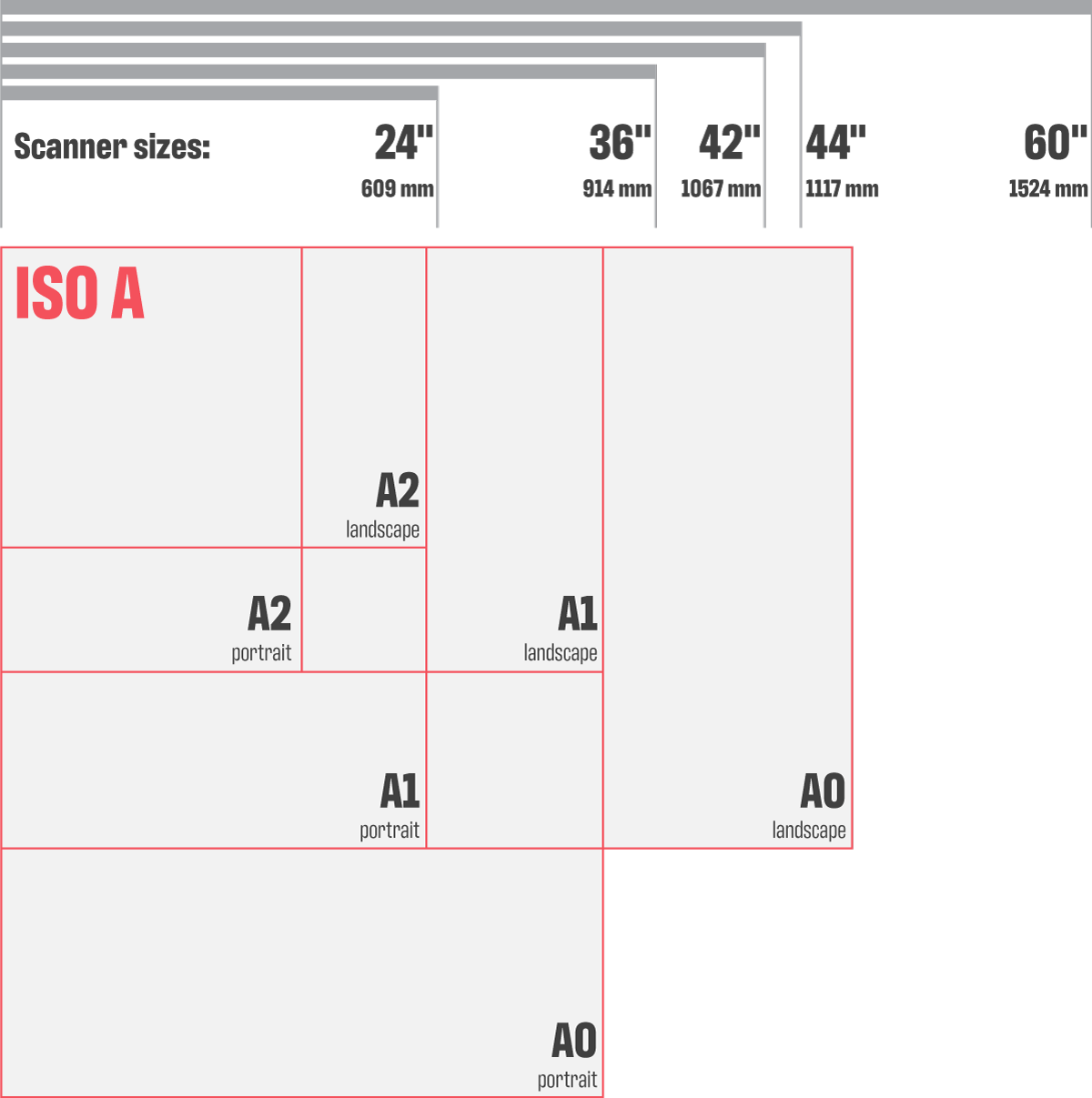
- A0: 84.1 × 118.9 cm (33.11 × 46.81 in)
- A1: 59.4 × 84.1 cm (23.39 × 33.11 in)
- A2: 42 × 59.4 cm (16.54 × 23.39 in)
ISO B paper sizes matched with large format scanner sizes
The ISO B (and A) paper standard is predominantly used in Europe by all kinds of industries.
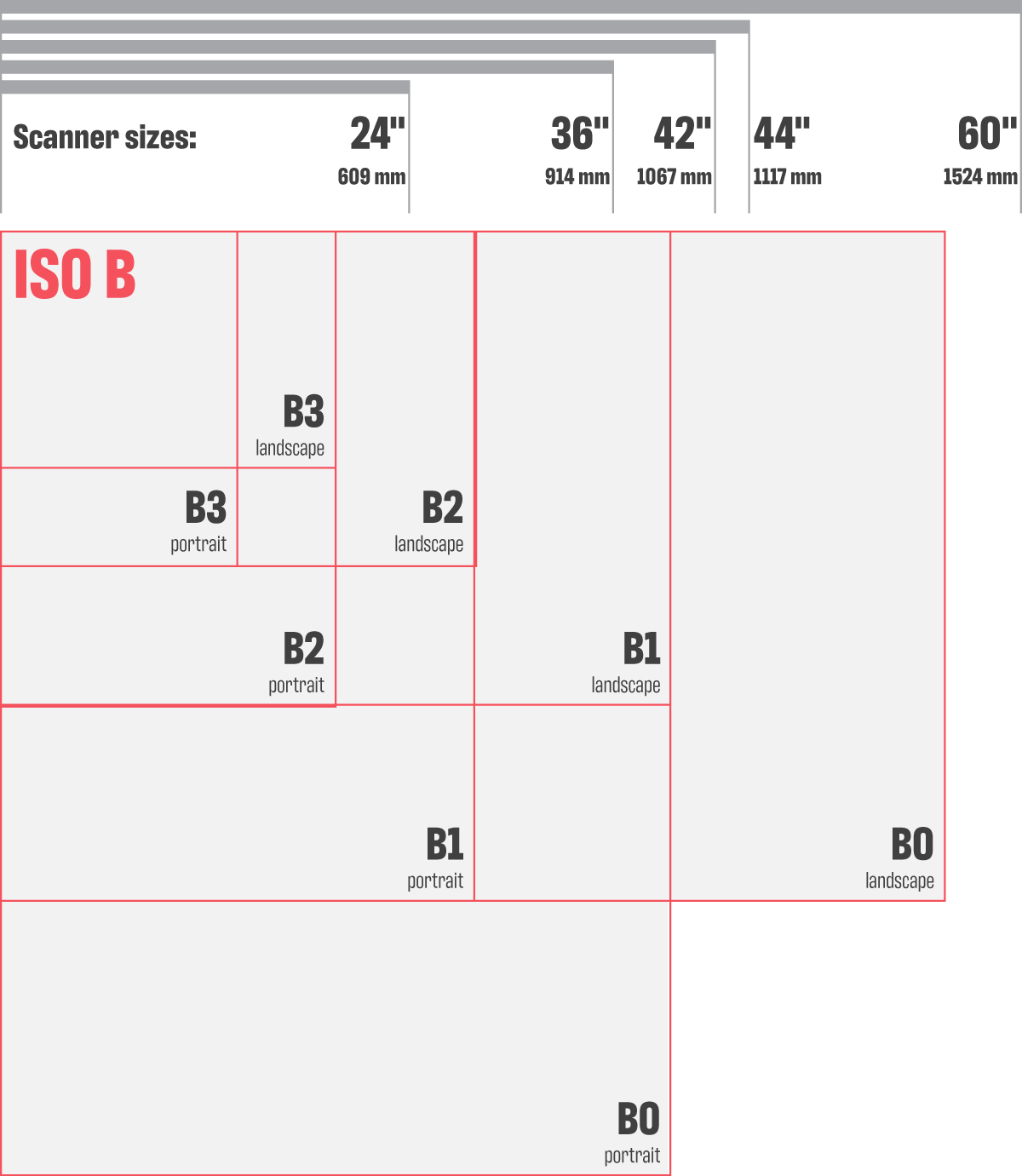
- B0: 100 × 141 cm (39.37 × 55.51 in)
- B1: 70.7 × 100 cm (27.83 × 39.37 in)
- B2: 50 × 71 cm (19.69 × 27.95 in)
- B3: 35.3 × 50 cm (13.9 × 19.69 in)
ARCH paper sizes matched with large format scanner sizes
ARCH is the standard US paper size for architectural drawings.

- ARCH C: 18 × 24 in
- ARCH D: 24 × 36 in
- ARCH E1: 30 × 42 in
- ARCH E: 36 × 48 in
ANSI paper sizes matched with large format scanner sizes
Paper sizes by The American National Standards Institute (ANSI).
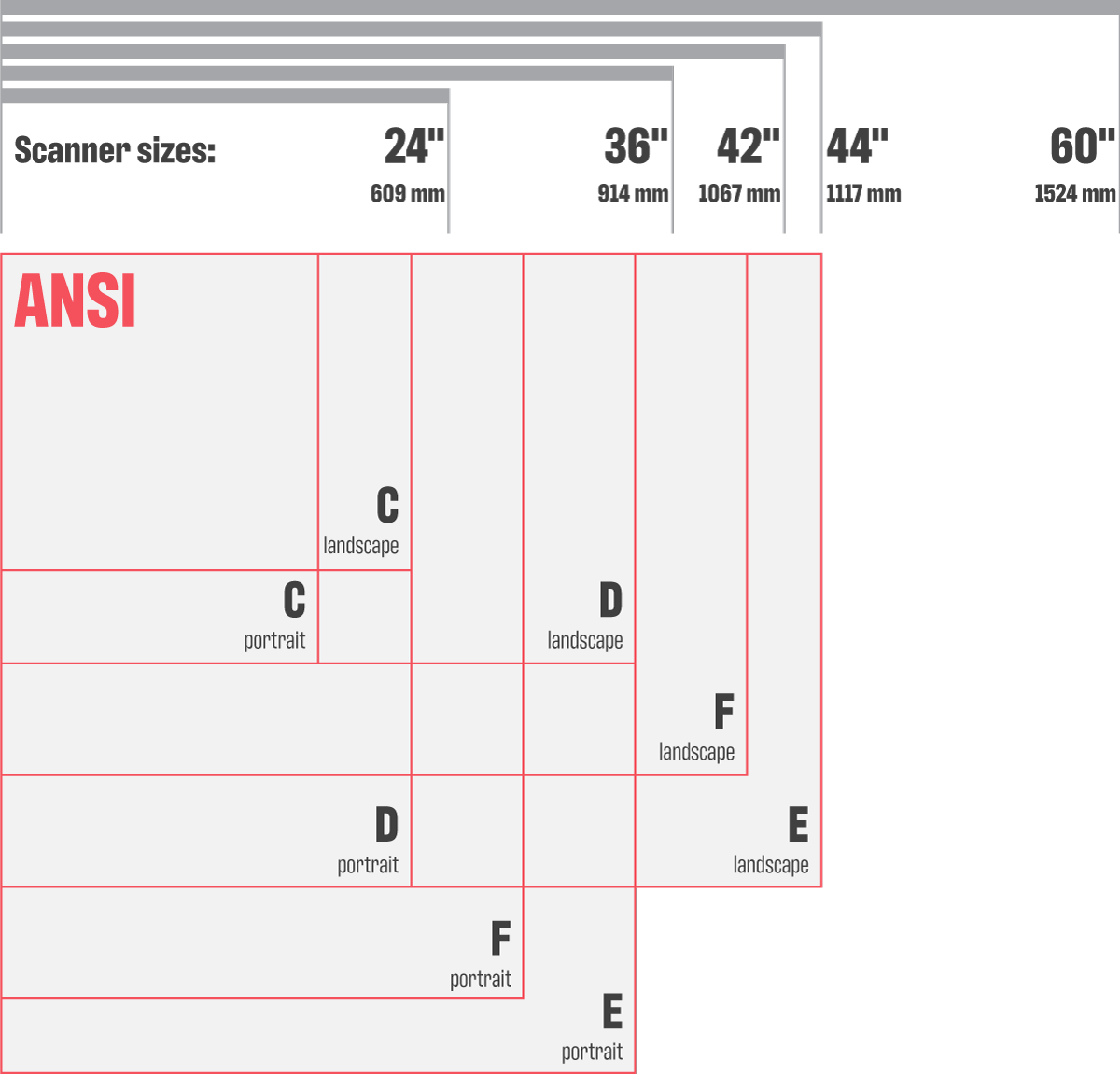
- ANSI C: 17 × 22 in (432 × 559 mm)
- ANSI D: 22 × 34 in (559 × 864 mm)
- ANSI E: 34 × 44 in (864 × 1118 mm)
- ANSI F: 28 × 40 in (711 × 1016 mm)
What if your originals are custom-sized and maybe not even paper?
The large format scanning market also offers flatbed scanners for newspapers and posters, dedicated book scanners and the newest product group: contact-free scanners, which are especially suitable for paintings, artefacts, textiles, artwork and other delicate originals.
Unlike the most common sheet-fed large format scanners, contact-free scanners will scan odd-sized and rather thick originals. Read more about contact-free art scanning and the IQ FLEX flatbed scanner.
From paper to scanner to file
Whether you’re an architect designing the skyline of a city, an artist crafting the next masterpiece, or an archivist preserving cultural heritage, large paper sizes are most likely part of your everyday. And whether you scan to preserve, to exchange or to showcase, a scanner will most likely be part of your digitization toolbox.
You provide the originals, we make it happen. New to the topic? Start with what large format scanning is.
Frequently asked questions
What scanner width do I need for A0?
A0 is 84.1 × 118.9 cm (33.11 × 46.81 in), so you need a scanner wider than 33.11 inches to scan it in portrait. Check the ISO A chart for how A sizes match common scanner widths.
How big is Arch E compared to Arch D?
Arch D is 24 × 36 in and Arch E is 36 × 48 in. Arch E1 sits in between at 30 × 42 in.
Why scan A1 or A0 in landscape?
A scanner wide enough to take A1 or A0 in landscape mode often increases your total scanning speed considerably.
How do I scan thick or odd-sized originals?
Most sheet-fed scanners are made for standard documents. However there are exceptions such as Contex HD Ultra X, it scans thick and rigid originals up to 15 mm, such as foam boards and mounted prints. For paintings, framed art or artefacts, use a contact-free scanner. You can also consider a flatbed scanner if you prefer.


